
Conversation history & captured leads
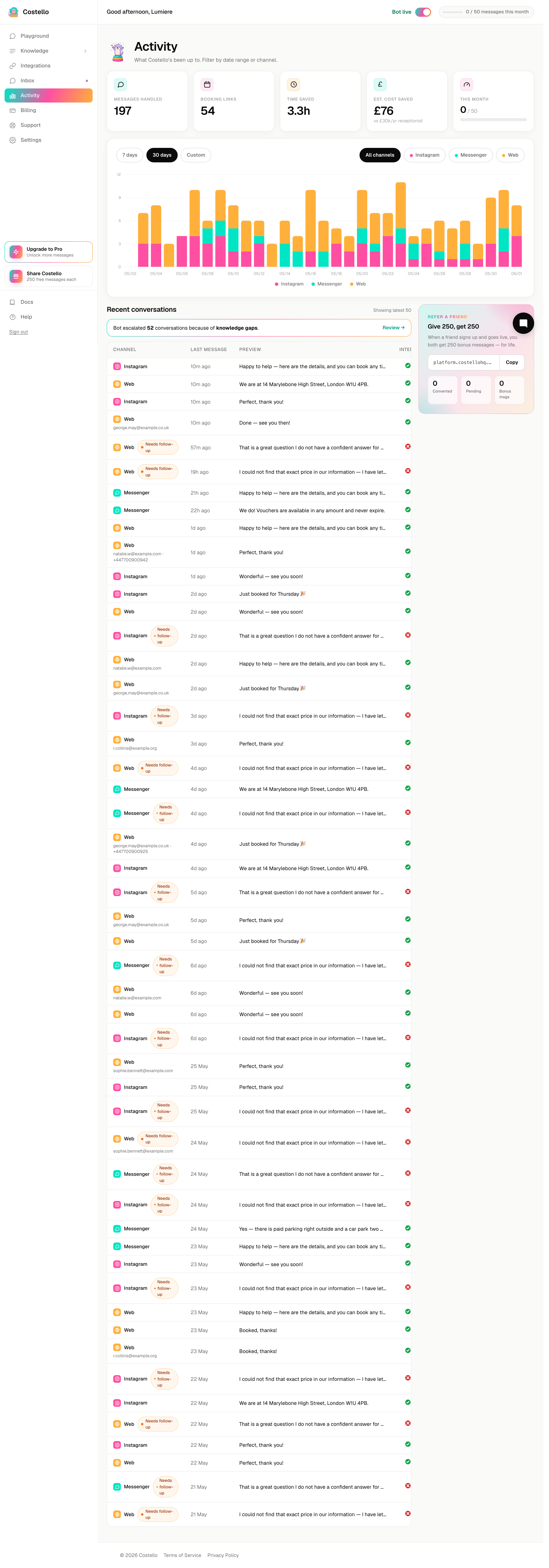
The conversation history table sits below the metrics on the Activity dashboard. It's your full record of every enquiry that has come in, how Costello handled it, and — best of all — the contact details it captured along the way. If a customer left an email or phone number, this is where you find it.
Conversations from every channel appear together, so you have one place to review the lot.
What each column tells you
| Column | What it shows |
|---|---|
| Channel | Where the conversation came from — Instagram, Messenger, or web chat. |
| Customer handle | The customer's name or username on that channel. |
| Last message | A short preview of the most recent message, so you can scan the table quickly. |
| Intent | What Costello worked out the customer wanted — for example a booking enquiry, a pricing question, or general interest. |
| Booking link sent | Whether Costello sent this customer your booking link. A strong sign of a serious lead. |
| Escalation | Whether the conversation was handed over, and the reason why. |
| Captured contact | Any email or phone number the customer shared during the chat. |
Focusing the table
The same controls that drive the rest of the dashboard apply here:
- Date range — show the last 7 days, 30 days, or a custom range.
- Channel filter — narrow to a single channel, or view them all together.
Use these to answer practical questions, like "who enquired this week?" or "which Instagram conversations led to a booking link?".
Following up your captured leads
The captured contact column is where the table earns its keep. Whenever a customer shares an email or phone number, Costello records it here — turning a passing chat into a lead you can act on.
A simple routine works well:
Set the date range to this week, or whatever stretch you're chasing up.
These are customers who were interested enough to leave their details.
This tells you how warm the lead is and whether they already have your booking page.
A quick, friendly follow-up to a warm lead is often all it takes to win the booking.
Not everyone books in the moment. The contact details in this table let you reconnect with people who showed interest but drifted off — often your easiest bookings to win back.
Your record of every enquiry
Beyond following up leads, the history table is simply your log. If you ever need to recall what a customer asked, how Costello replied, or whether something was escalated, it's all here. Pair it with the Inbox when you want to open the full thread and reply.