
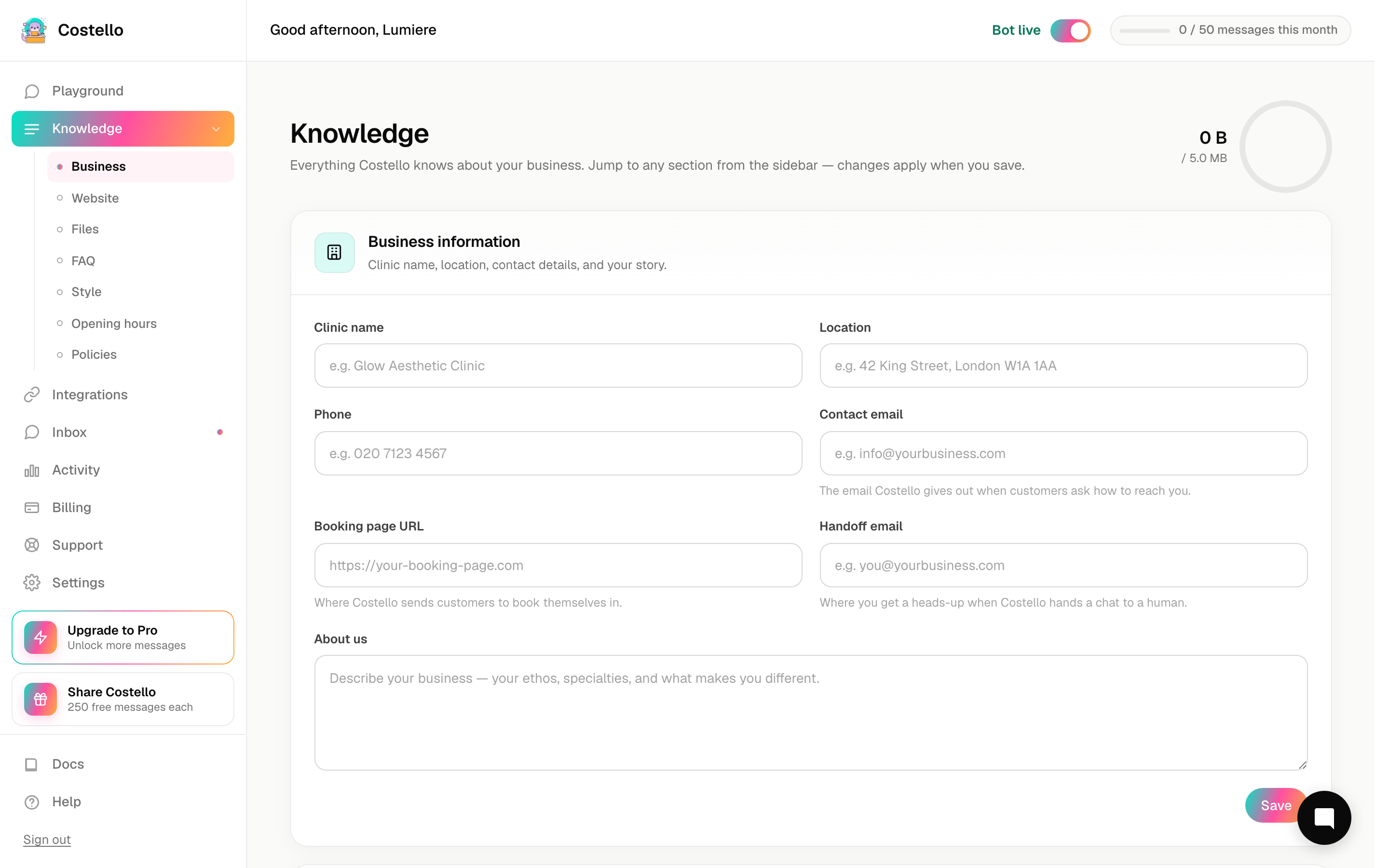
Business information
The Business Information section is the foundation of everything Costello knows about you. It's the first thing Costello reaches for when a customer asks "where are you?", "what's your number?", or "how do I book?". Getting these fields right makes every reply more accurate.
Open Knowledge in the left-hand menu and you'll find Business Information at the top of the page.
Before you start
Have these to hand:
- Your booking page link (Fresha, Square, Calendly, or similar).
- The email address where you want enquiries Costello can't handle to land.
- A sentence or two about your story for the "About us" field.
The fields, and why each matters
| Field | Why it matters |
|---|---|
| Business name | Used in greetings and throughout replies. A customer should always feel they're talking to your business. |
| Location / address | Powers "where are you?", parking, and directions questions. |
| Phone | Given out when a customer prefers to call, or when Costello hands off. |
| Contact email | Used for general enquiries and shown when a customer asks how to reach you. |
| Booking page URL | The link Costello sends qualified leads. This is how an enquiry turns into a booking. |
| Handoff email | Where Costello forwards anything it can't answer or that needs a human. |
| About us | Gives Costello your story so replies feel like you, not a generic bot. |
Booking page URL
This is one of the most important fields. When Costello has qualified a lead — confirmed they're a good fit and ready to book — it hands them this link. If it's missing or wrong, serious enquiries have nowhere to go.
Paste the exact link your customers use to book. Most spas use Fresha, Square, or Calendly. Whatever you use, Costello simply sends customers there; it doesn't manage your calendar itself.
Handoff email for escalations
When a question is outside Costello's knowledge, or a customer needs a real person, Costello forwards the enquiry to your handoff email. Think of it as the safety net.
Use an address someone actually checks — ideally your main inbox or a shared team address. If this is blank, escalations have nowhere to go and a customer could be left waiting.
If you switch booking systems or change which inbox your team watches, update these two fields straight away. They're the difference between a captured lead and a lost one.
Writing a good "About us"
Two or three sentences is plenty. Cover who you are, what you're known for, and the feeling you want customers to have. Costello uses this to colour its replies so they sound like your business rather than a script.
Example: "Founded in 2019, we're a small, friendly skin clinic in Leeds specialising in medical-grade facials and laser treatments. Our team are all qualified aesthetic practitioners and we pride ourselves on honest advice — never a hard sell."
After you save
Costello retrains automatically whenever you change these fields, so your updates take effect within about a minute. Pop into the Playground afterwards and ask a couple of questions to check everything reads correctly.