
Tracking your referrals and earnings
Your affiliate dashboard is mission control. It shows every click, every sign-up, and exactly how much you've earned, are about to earn, and have been paid. It updates in real time as your referrals move from a click to a paying customer.
Find it at platform.costellohq.com/affiliates/dashboard.
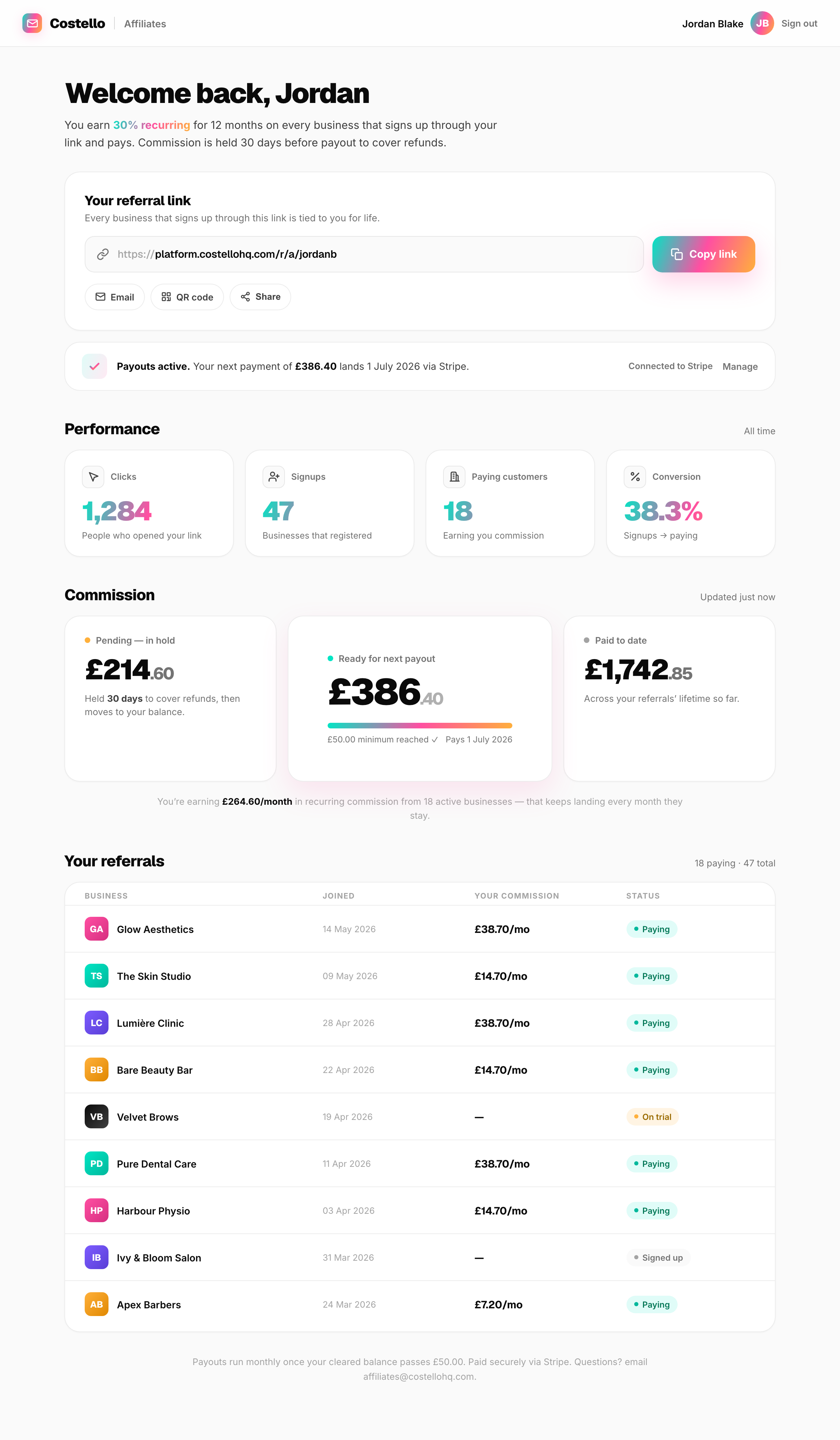
Your referral link
Right at the top is your link, with buttons to Copy, Email, make a QR code, or Share it. This is the link to spread everywhere — see Sharing your referral link.
Performance
Four headline numbers tell you how your sharing is going:
| Stat | What it means |
|---|---|
| Clicks | How many people opened your link. |
| Signups | How many of those went on to register a business account. |
| Paying customers | How many referred businesses are on a paid plan right now — these are the ones earning you commission. |
| Conversion | The share of your sign-ups that became paying customers. |
Commission
Three cards show the money, split by where each pound is in its journey:
Every commission is held for 30 days (60 for annual plans) before it becomes payable. That buffer means if a customer is refunded shortly after paying, the commission is reversed cleanly before any money has changed hands. Once the hold passes, it moves to Ready for next payout. See Getting paid.
If you have paying referrals, you'll also see your monthly run rate — the recurring commission you're currently earning every month from active businesses. That's the number that keeps landing as long as they stay.
Your referrals
The table lists every business that signed up through your link, newest first. Each row shows:
- Business — the name of the referred business.
- Joined — when they signed up.
- Your commission — the recurring amount you earn from them each month (shown once they're paying).
- Status — one of:
| Status | Meaning |
|---|---|
| Signed up | They've created an account but aren't on a paid plan yet. No commission yet — but they're tied to you, so you'll earn the moment they upgrade. |
| On trial | They're trialling a paid plan. Commission starts on their first real payment. |
| Paying | They're a paying customer. You're earning 30% recurring from them. |
Setting up payouts
If you haven't connected your bank yet, a banner near the top invites you to set up payouts. Until you do, commission still accrues — it just can't be sent. Once connected, the banner becomes a green confirmation showing your next payment and date. Full walkthrough in Getting paid.